
Backbone — Next-Level Play
BackboneSocial
4.63.24K Reviews
- Version
- 1.15.7
- Installs
- 500.00K
- Age Rating
- Teen
Screenshots
Our Review of Backbone — Next-Level Play
 Analysis by Appyee
Ever felt like mobile gaming just doesn't cut it when you’re craving that console-quality experience? Well, say hello to Backbone — Next-Level Play. This app is taking mobile gaming up a notch, and I'm here to spill the beans on how it's turning our phones into gaming powerhouses.
Before you commit, think about the kind of play you want
The first question I’d ask a friend is not whether Backbone sounds exciting, but whether they already enjoy playing games on a phone and want a more controller-led way to do it. If you mainly play quick touch-screen games for a few minutes at a time, the app may not change enough to justify changing your routine. If you want to use a phone for longer sessions, revisit games you already own or access, or keep gaming while away from a television, its controller-centered approach makes more sense.
It helps to separate the app from the hardware it is designed to accompany. Backbone is free to download, but the experience described here depends on having a Backbone One controller, so the app alone is not a shortcut to physical controls. I’d decide whether the controller suits your phone and habits before treating the app as a complete gaming solution. That distinction matters: someone browsing for a free social app will have a very different experience in mind from someone trying to organize mobile and streamed play.
Backbone is a social app from Backbone, and its audience is clearly people who like gaming as something they do with friends as well as something they play alone. It has a 4.6 average from around 20,000 ratings, with roughly 3,100 written reviews and over 500,000 installs. Those figures suggest a well-established audience, but they don’t tell me whether the controller-and-phone combination fits a particular person. I’d use them as context, not as a reason to buy hardware without first considering how often I would use it.
Where the hub is more useful than a pile of separate apps
The main advantage I see is the effort it can save when your gaming is spread across different places. Instead of thinking of the phone only as a screen for touch games, Backbone gives you a hub for games, friends and play-related activity. That is valuable if you switch between mobile titles and games reached through services or remote streaming. It is less compelling if all you want is a controller for one game and you already have a setup that launches it quickly.
A practical example: I might have a few minutes before leaving home, then want to continue a longer session during a quiet break later. A single place to find games and see what friends are playing can make those short windows easier to use. The benefit is not that every game suddenly becomes a console game; it is that the app gives controller-based mobile play a more organized front door. I would still check that the individual game or service I care about works in the way I expect before building my routine around it.
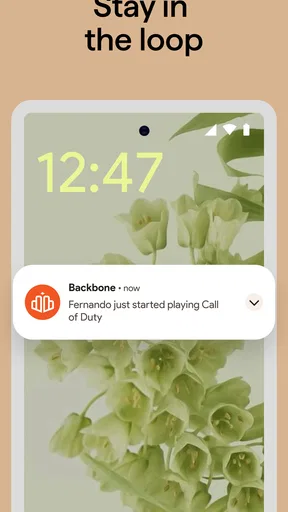
Social features are most useful when the people I play with are already part of my gaming circle. Seeing what friends are playing can help me decide what to launch, and the option to join or chat gives the app a purpose beyond being a controller companion. If my friends use different platforms or don’t play at the same times, that social layer may feel quiet. I wouldn’t choose it solely as a new place to meet players; its strongest case is helping existing play feel more connected.
Where Backbone has an edge—and where it does not
Compared with relying on touch controls, a physical controller can be a more comfortable fit for games that benefit from familiar buttons and sticks. Compared with carrying a dedicated handheld gaming device, the phone-based approach means using a screen and device I already bring with me. The trade-off is that play now depends on the phone, the controller and, for streamed games, a suitable connection and access to the relevant service. It is a convenient arrangement, not a way to remove every dependency.
For someone who already owns a console, streaming from it can make a phone useful when the television is occupied or they are away from their usual seat. That is a different use case from playing a game installed directly on the phone, and I’d keep those expectations separate: streaming relies on the console and network conditions, while mobile play does not have the same setup. If dependable play without network reliance is the priority, a locally playable mobile game or a dedicated handheld may be the better choice.
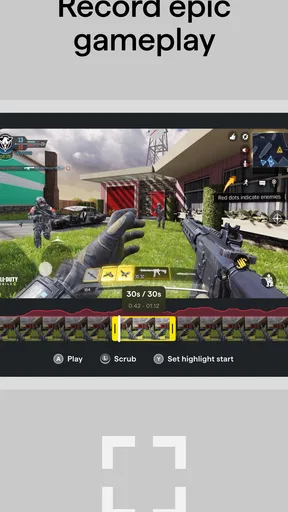
The app’s sharing tools also suit a particular kind of player. Recording a good moment to send to friends is a straightforward reason to use them, while broadcasting is more worthwhile for someone who already wants an audience and is comfortable setting up a stream. I would not treat the presence of sharing options as a guarantee that streaming is effortless in every situation. A quiet place, a stable connection and a game worth sharing still matter; for private, casual play, recording a clip may be the more sensible option.
What’s the Deal with Backbone?
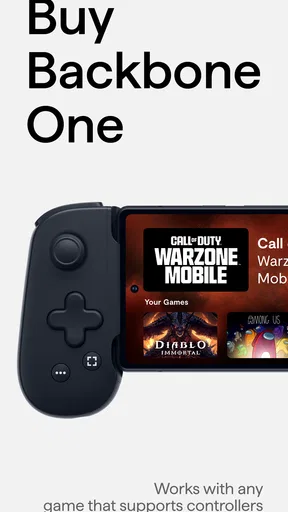
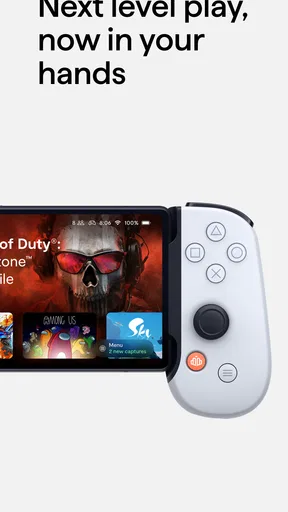
So, let’s dive right into what makes Backbone — Next-Level Play a game-changer. At its core, it’s a platform that pairs with the Backbone One controller, transforming your iPhone into a legit gaming console. The app acts as a hub where you can access a bunch of games, connect with friends, and even stream your gameplay. It’s like having a mini Xbox or PlayStation in your pocket, and I’m all in for that!
The Setup: Easy Peasy
Setting up Backbone is a breeze. Once you’ve got the Backbone One controller, just slide your phone into it, download the app, and you’re good to go. The app syncs seamlessly with your controller, and you’ll find your games neatly organized. It’s user-friendly and doesn’t require any geeky tweaking or hacking, which is a relief for tech noobs like me.
There is one useful bit of planning I’d do before starting: check that the phone and operating system you intend to use meet the app’s requirements, and make sure the controller is the right match for that device. The current version is 1.13.11, and the minimum operating system is 11. I’d also treat setup as the start of a small routine rather than a one-time promise that every game will appear in the same place. Different games and services can have their own launch paths, so keeping the titles you actually use easy to find is more helpful than trying to organize everything at once.
Game On: The Experience
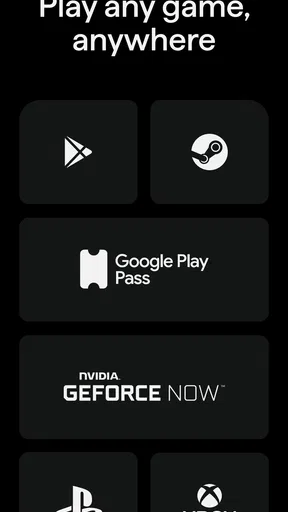
Now, let’s talk about the gaming experience. The app supports a wide range of games, from casual mobile ones to more intense titles that you’d typically play on a console. And the best part? You can play games from services like Xbox Game Pass, Apple Arcade, and even stream from your PlayStation. The controls are smooth and responsive, making it feel like you’re holding a real console in your hands.
That mix is also where I’d set realistic expectations. Backbone brings different ways to play together, but it does not make subscription access, a console, or a network connection unnecessary. Before settling in for a session, I’d confirm which games are available through the services I already use and whether the game is intended for local mobile play or streaming. That quick check prevents the frustrating moment of opening the hub only to discover that the title I had in mind depends on another part of my setup.
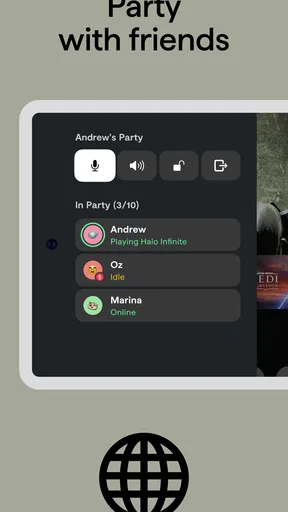
There’s also this cool social feature where you can see what your friends are playing, join games together, or even chat while you play. I love how it brings that community vibe to mobile gaming. Plus, the app has a simple, sleek interface that makes navigating through your games and settings a total breeze.
For me, the social layer is a bonus rather than a requirement. I’d use it to coordinate with friends who are already active, but I wouldn’t expect it to replace the communities built around a particular game or service. If a friend is not using Backbone, the app may not become the shared meeting point I hoped for. That makes it a better fit for an established group than for someone who wants a social network first and gaming tools second.
Streaming and Sharing: Show Off Your Skills
Another highlight of the app is the streaming and sharing feature. You can easily record your gameplay and share it with friends or on social media. It’s perfect for those moments when you pull off an epic move and want the world to see. The app even lets you stream directly to platforms like Twitch, turning you into a mobile streaming star if that’s your thing.
I’d start with a short recording before planning a longer broadcast. That gives me a low-pressure way to see whether capturing a moment fits my habits, without turning a relaxed gaming session into a production task. If I find myself wanting to share regularly, streaming may be worth exploring; if not, the feature can stay in the background. This is one of those cases where the app offers room to grow, but there’s no need to use every tool just because it is available.
Beyond Gaming: A Complete Package
But wait, there’s more! Backbone — Next-Level Play isn't just about gaming. The app doubles as a media center where you can enjoy apps like YouTube, Twitch, and Netflix, all while using the controller. It’s like your entertainment hub on the go, and I’m seriously impressed by how versatile it is.
That extra flexibility is handy when I want one phone setup for more than a game, but I’d still think of gaming as the main reason to choose it. If my priority is simply watching videos, the usual media apps already do that job, and a controller-focused hub may add little. The Teen content rating is another practical point for families: I’d check whether the app’s social and sharing features suit the intended user rather than assuming the rating answers every household’s question.
What it costs to make it part of your routine
The app itself is free, while in-app purchases are listed at $39.99 per item. I’d look carefully at what an offered purchase adds before paying, and distinguish those purchases from any separate cost involved in getting the controller or accessing a gaming service. The key decision is not just whether the app is free to install; it is whether the full combination of hardware, games and any optional purchases makes sense for how I actually play.
Switching from touch controls has a small learning curve even when setup is simple. I would give familiar games a little time with the controller before judging the feel, then try a game where physical controls are especially useful. If the phone feels awkward to carry or I keep reaching for my console instead, that is a sign the new routine is not earning its place. On the other hand, if I already take my phone everywhere and regularly wish I had better controls, the change may be easy to justify.
Backbone is best for someone who wants a phone to do more gaming work, already has friends or services to connect with, and is willing to use a compatible controller. I’d skip it if I mostly play simple touch-first games, rarely game away from a console, or do not want an extra piece of hardware involved. A dedicated handheld can be a better fit for someone who wants a separate gaming device, while a standard mobile setup is simpler for casual play. The choice comes down to whether the hub and controller solve a real problem for you.
Final Thoughts: A Must-Have for Gamers
In a nutshell, Backbone — Next-Level Play is a must-have for serious mobile gamers. It’s bridging the gap between mobile and console gaming in a way that’s intuitive and accessible. Whether you’re a casual gamer or a hardcore enthusiast, this app, paired with the Backbone One controller, is sure to elevate your gaming experience. So, if you’re ready to take your mobile gaming to the next level, this is definitely worth checking out!
My recommendation is more selective than “every gamer needs it.” I’d try it if I already want controller-based play on my phone and can name a few games, friends or streaming situations that would make me reach for it each week. If I cannot picture those moments, I would hold off rather than assume a polished hub will create a new habit by itself. The app has reached version 1.13.11, but my decision would still rest on fit: phone gaming, a compatible controller and the services I actually use.
And there you have it, folks! That’s my take on Backbone. Trust me, once you go Backbone, you won't look back!
Verdict
Strengths of Backbone — Next-Level Play
- Seamless controller integration.
- Compatible with multiple games.
- Real-time gaming updates.
- High-quality build design.
- User-friendly interface.
Limitations of Backbone — Next-Level Play
- Limited Android compatibility.
- Requires subscription for features.
- Short battery life.
- Occasional connectivity issues.
- Limited customization options.
Similar Picks in This Category
View All
Meta Platforms, Inc.4.6

Instagram4.0

Likee-Live, Chat & Party Games
Likeme Pte. Ltd.4.4

Facebook Lite
Meta Platforms, Inc.4.5

TikTok - Videos, Shop & LIVE
TikTok Pte. Ltd.4.0

Moj: Free Short Drama & Reels
ShareChat4.1
Frequently Asked Questions
What platforms are compatible with Backbone?
Backbone is compatible with both iOS and Android devices. It’s designed to enhance mobile gaming by providing physical controls that connect seamlessly with your smartphone. Make sure your device supports the latest version of the Backbone app to ensure full compatibility and access to all features.
Does Backbone require an internet connection to function?
While Backbone itself can function without an internet connection, many of the games and features it supports may require online access. This includes cloud gaming services and multiplayer games, which need a stable internet connection for the best experience.
How does Backbone improve mobile gaming?
Backbone transforms your smartphone into a handheld console, offering physical controls that enhance precision and comfort during gameplay. It supports a wide range of games, providing a more immersive experience, and integrates with popular cloud gaming services to expand your gaming library.
Is there a subscription required to use Backbone?
Backbone offers an optional subscription service called Backbone+ that provides additional features, such as exclusive perks, advanced recording and streaming capabilities, and access to new updates. However, the core functionality of the device can be enjoyed without a subscription.
Can Backbone be used for non-gaming applications?
Yes, Backbone can be used for various non-gaming applications, like streaming video content or browsing the web, though its primary design is for gaming. The ergonomic design and physical controls can enhance any app that benefits from precision inputs.
